How to make a Laughing Fairy AI video
By Sendare AI Studio · Updated October 23, 2026 · Verified sources listed below
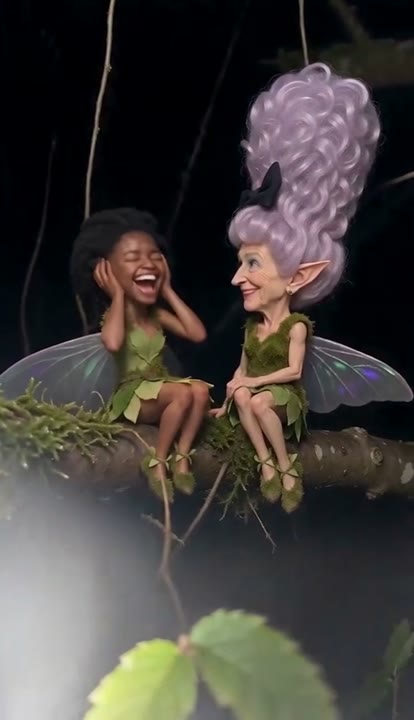
Filmed like found footage with a harsh phone flash in a dark forest, the Laughing Fairy meme ('I really wish I knew what they were saying') passed 10.3 million views on TikTok in October 2026. Here is where the gossiping fairy clip came from and how to turn your photo into the 7-second video.
Make your own Laughing Fairy video
One photo, 7s 720p MP4 with synced soundtrack, no watermark. $9.90 one-time.
How do I make the Laughing Fairy AI video step by step?
1) Pick a clear, well-lit front-facing photo where your eyes, mouth and hair are uncovered. 2) Upload it on Sendare's Laughing Fairy AI page. 3) Choose a one-time pack ($9.90 for 1 video) and press Put me in the video. 4) Seedance 2.5 renders the 7-second 720p vertical night-forest clip in 4 to 7 minutes. 5) Download the MP4 with the whispering and giggling sound already synced.
Where did the Laughing Fairy meme come from?
The base AI creature clip was posted on TikTok in early October 2026 with captions like 'I really wish I knew what they were saying' and 'Milili prilili ñaca jijiji' (@key_s64, 1.1M views), before @ilaria_is_me's October 13 parody hit 10.3 million views and 2.2 million likes.
What happens second by second in the 7-second clip?
0–1.2s: the right fairy leans in and whispers a secret into your ear; 1.2–2.8s: you pull back and slap a hand over your mouth in shock; 2.8–5s: you clamp both hands over your pointed fairy ears and crack up; 5–7s: both fairies double over laughing on the mossy branch as their translucent wings flutter.
Does the downloaded video include the fairy giggling sound?
Yes. Your finished 7-second MP4 ships with the viral whispering, giggling and night-forest cricket audio synced to the laugh, plus a Silent MP4 option on your order page.